
Subs'n'Docs

Features

Reminders for documents, subscriptions and cards, in one calm place.

Subs'n'Docs keeps only names and dates, and helps with the small things around them: which document depends on which, which card pays for what, and when to hear about it.

Spotted puppy sitting calmly

Know what a card change will break

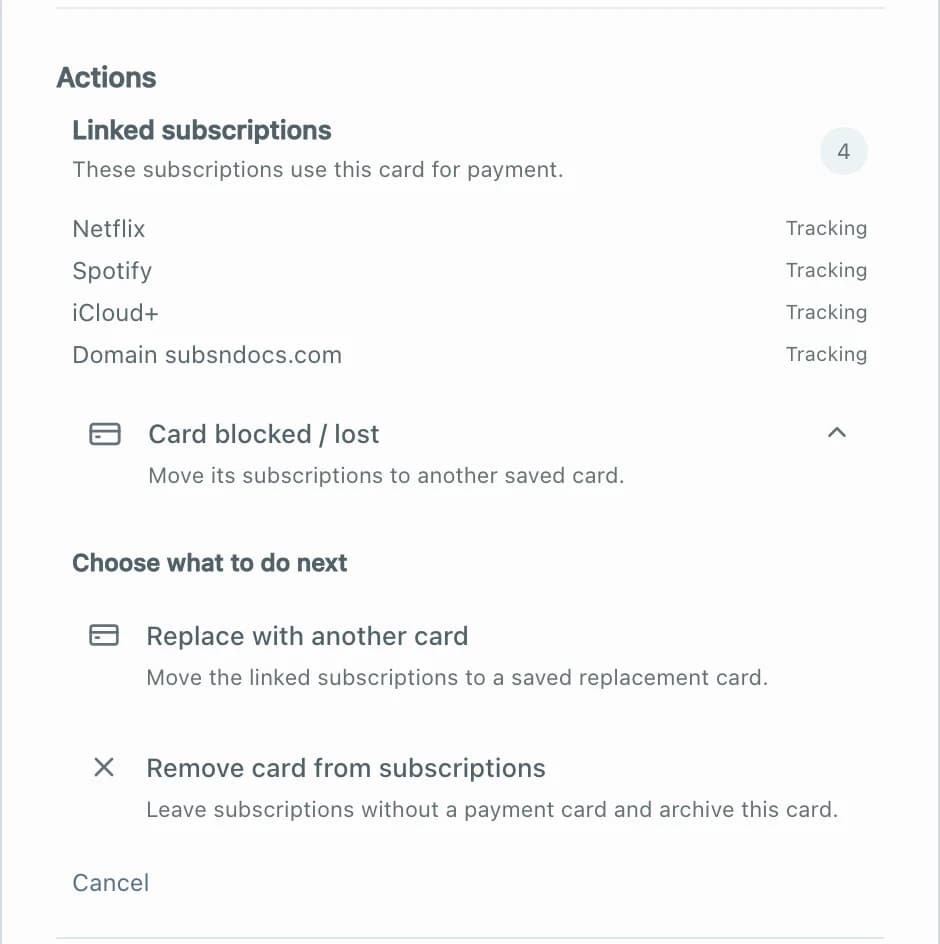
Add a card with just a nickname, the last four digits and the expiry month, then link each subscription to the card that pays for it.

Cards expire quietly, and a week later a streaming service stops, cloud storage is locked or a domain fails to renew. Nobody remembers every service charged to a card. Here each subscription can be linked to its card, so the list already exists when you need it.

You only store a nickname, the network, optional last four digits and the expiry month. A full card number and CVV are never asked for, and never should be entered.

A card with four linked subscriptions and the options to replace the card or remove it from subscriptions
  • Get a reminder before a card expires, with every linked subscription in one list
  • Replace a lost or blocked card and move all its subscriptions in one step
  • See how much each card pays for
  • Cards are free and are not treated as subscriptions

Reminders on your terms

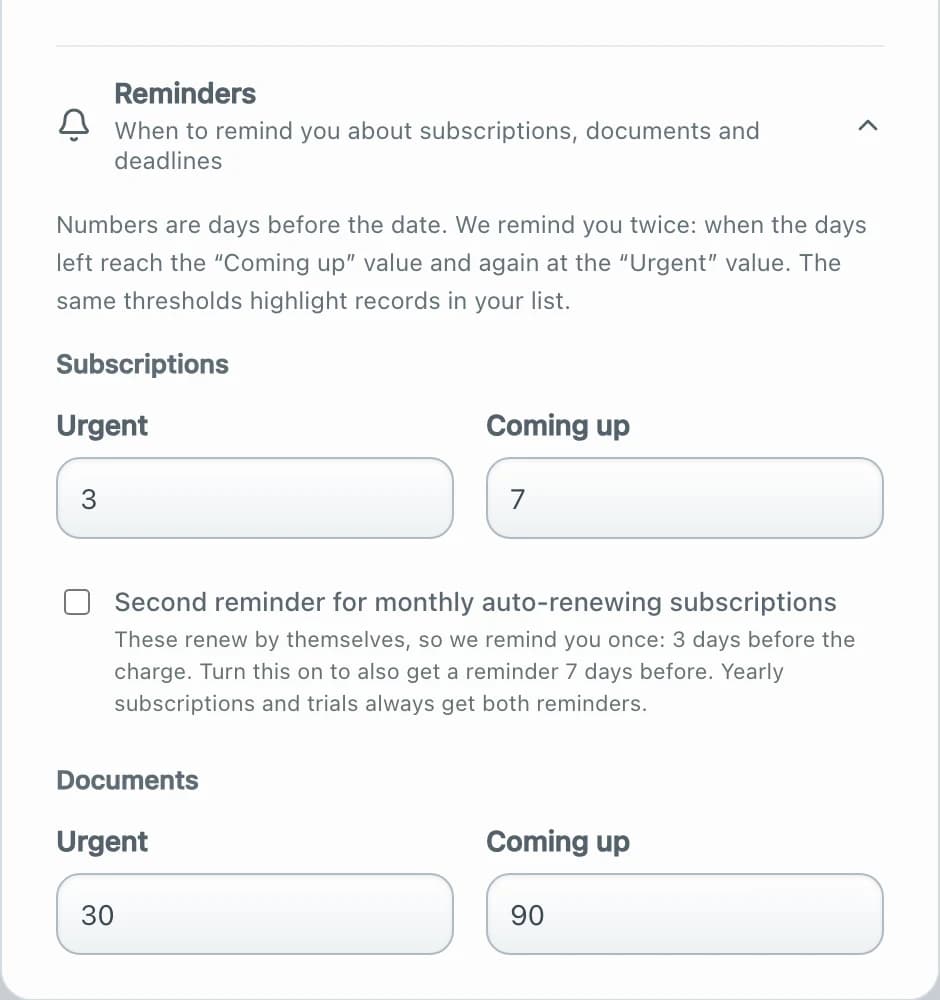
Choose how many days ahead you want to hear about subscriptions, documents and deadlines. Two reminders, one early and one urgent.

A reminder on the day of the deadline is usually too late. You set how many days ahead you want to hear about subscriptions, documents and deadlines, separately, because a passport needs months and a monthly subscription only days.

Reminders arrive in Telegram. A private calendar feed adds every date to the calendar you already use, on any device. Subscriptions you do not want to hear about can be muted one by one.

Reminder settings with urgent and coming-up thresholds in days for subscriptions and documents
  • Separate thresholds for subscriptions, documents and deadlines
  • An optional second reminder for monthly auto-renewing subscriptions
  • Yearly subscriptions and free trials always get both reminders
  • Delivery to Telegram and a private calendar feed
  • Mute individual subscriptions

Little notes that save time

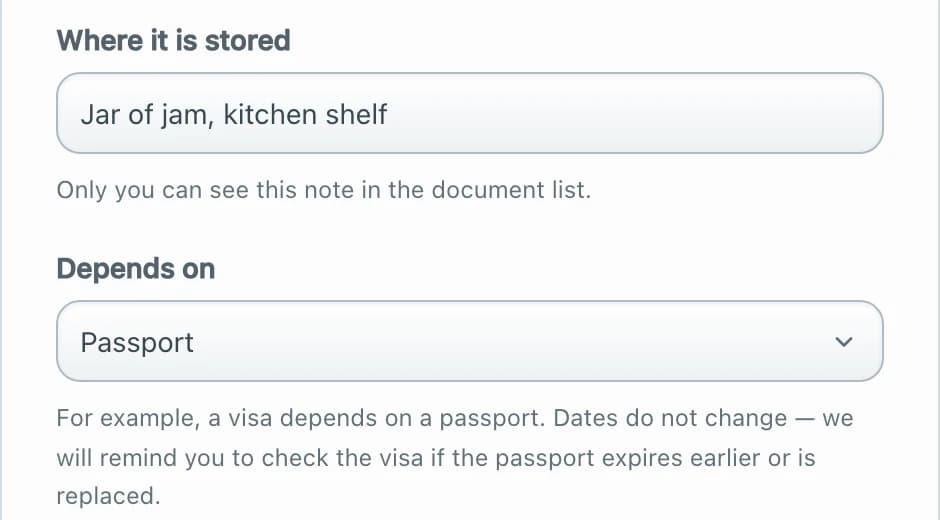
Write down where a document is kept, whether that is the blue folder or a jar of jam. Keep the link for cancelling next to each subscription.

An expiring date is only half of the job. You also need to find the document, or find the page where a subscription can be cancelled. Both can be written next to the item as a short note.

These notes are plain text that you write yourself. They are shown to you in the list and are there to save a few minutes at the moment they matter.

A document form with the fields where it is stored and what it depends on
  • A short note on where a document is kept
  • A link to cancel or manage a subscription
  • A place for any extra note on an item
  • Nothing is required, use only what helps

See what your subscriptions cost

Monthly and yearly totals in the currency you choose, split by category and by card.

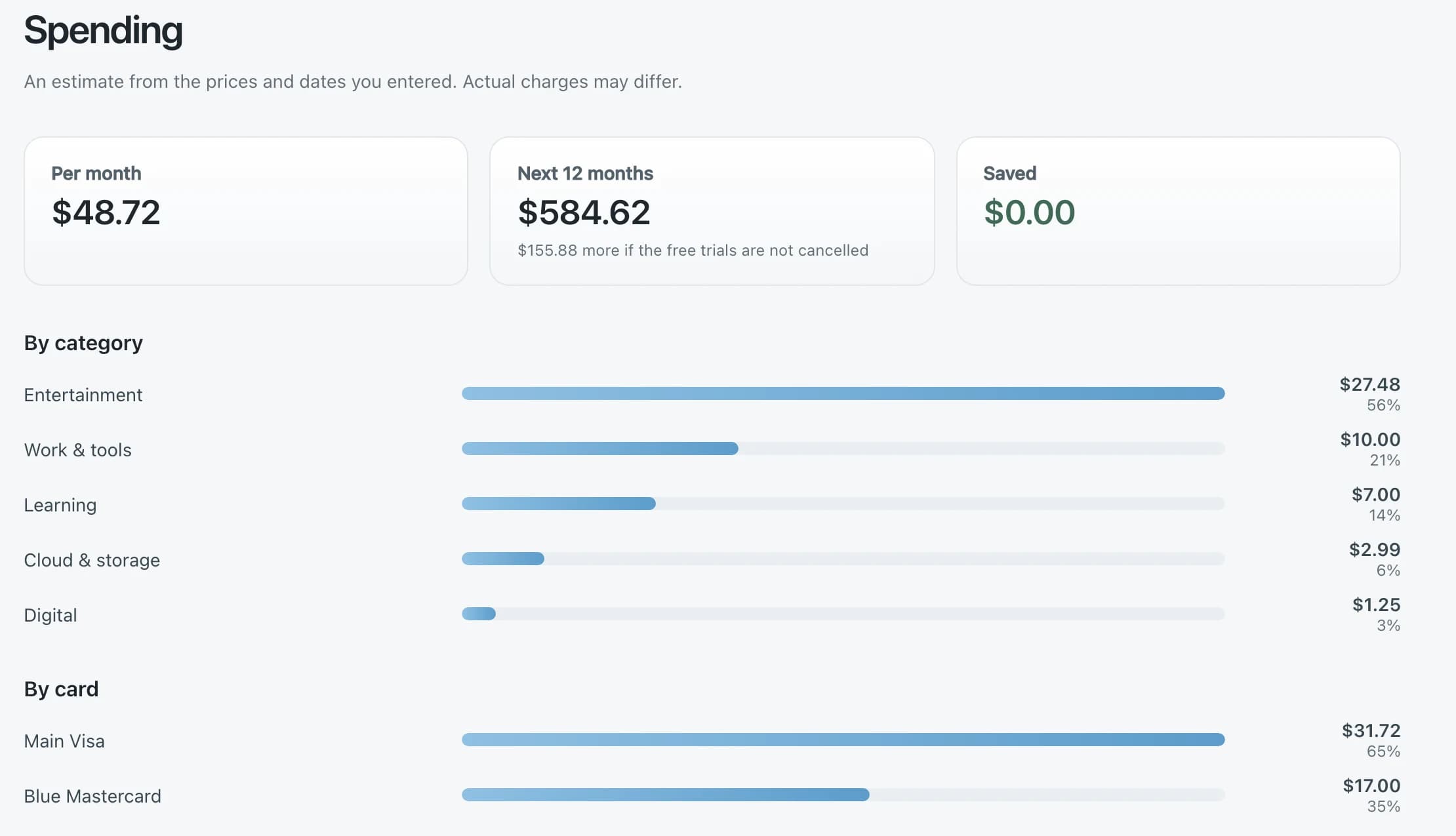
Small charges add up, yearly renewals arrive by surprise and prices change quietly. The spending view is an estimate built from the prices and dates you entered, so it never needs access to your bank or email.

It also shows what free trials will cost if you forget to cancel them, and keeps the history of price changes, so you can see when a subscription became more expensive.

Spending view with monthly and yearly totals and bars by category and by card
  • Totals per month and for the next 12 months
  • Breakdown by category, by card and by profile
  • The cost of free trials that are not cancelled
  • Price history and savings from cancelled subscriptions
  • Display in the currencies you choose, with rates updated automatically

Everyone in one place

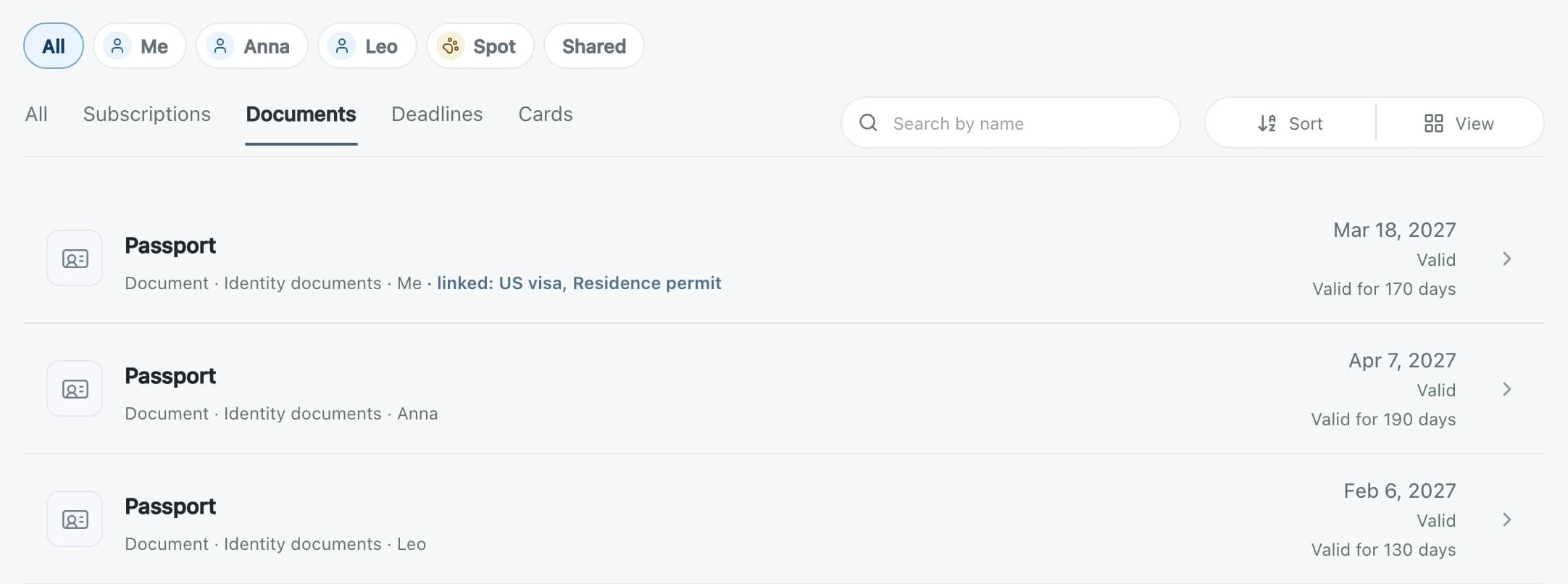
Add profiles for family members, pets or a car, and filter the list by person. Anna has her passport, Spot has his vaccinations.

Passports, insurance and check-ups belong to different people, and a pet has its own vaccinations. Add a profile for each of them and filter the list by person, or keep an item shared when it belongs to the whole household.

Nobody else needs an account. Profiles are labels in your own space. Shared family spaces with several admins are planned as the next step.

The list filtered by profiles Me, Anna, Leo, Spot and Shared, showing three passports for different people
  • Profiles for people, pets, vehicles and other things
  • Filter the list by person, or show shared items
  • Assign a document, a deadline or a subscription to a profile
  • One overview for the whole family

Questions

Do I need to connect my bank or email?

No. You add items yourself, and the spending view is an estimate from the prices and dates you entered.

Where do reminders arrive?

In Telegram and in your calendar through a private feed. Email reminders are planned.

What does a document link change?

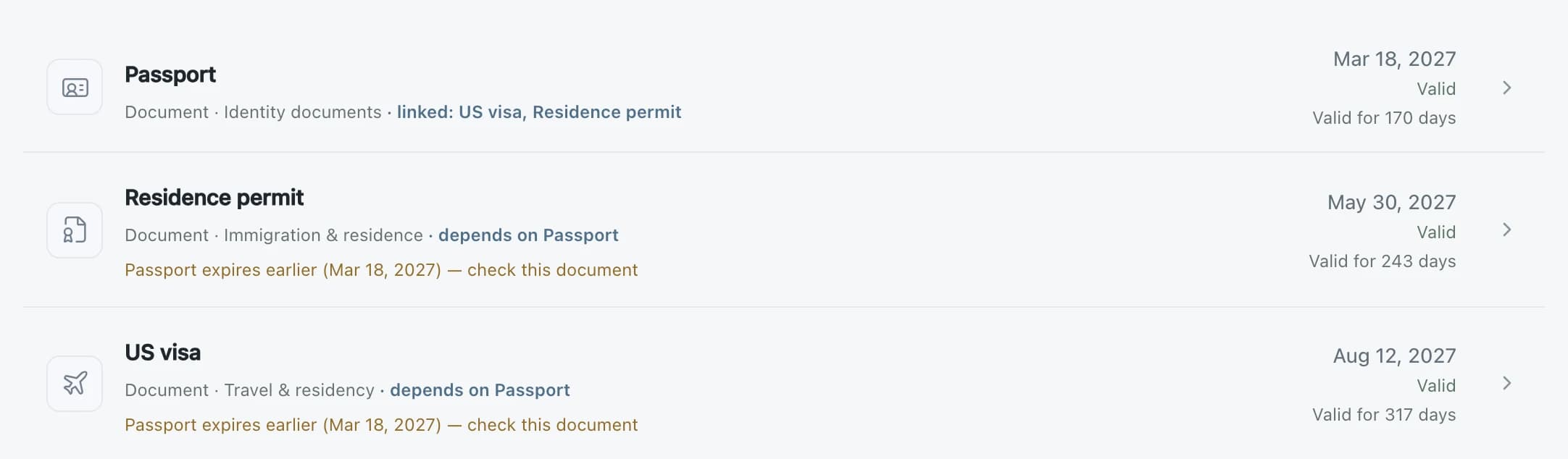
Dates stay as you entered them. A linked document shows a warning when the one it depends on expires first, so you can check it in time.

Can I track things for my family or pets?

Yes. Add a profile for each person, pet or vehicle and filter the list by profile. No extra accounts are needed.